


Call us on toll free
888.577.6653

We are the leader in providing high quality hookahs for your smoking pleasure.
Continental
United States Only

| 1) | Add at least $95 of merchandise to your shopping cart. |
| 2) | On the main shopping cart page, scroll to the bottom portion to locate the Discount Coupon field. |
| 3) | Type FREE SHIP in the Discount Coupon field and click "Apply Discount." |
| 4) | Your shopping cart will reflect the Free Ground Saver Shipping Promotion |
| 5) | Complete the online checkout process and enjoy the Free Shipping. |
| 6) | Make sure you're available when the shipping carrier attempts delivery of your order. |
Credit Card Billing Addresses Are
Request to Verify Cardholder
Information For Security Purposes Only.
Order By 3PM EST
and Choose Ground
Expedited Shipping
ENTER YOUR PROMOTIONAL CODE
BEFORE CHECKOUT.

Learn more about our shipping
options and rates

to purchase tobacco products
Don?t worry,
be happy.
Make sure the shipping address is complete and accurate to avoid an Address Correction Fee.
Know the rules before returning or exchanging your order.

When you redeem your smoke points at SouthSmoke.com, you convert your Smoke Points into automatic discounts which may be immediately used on online orders.
|
|

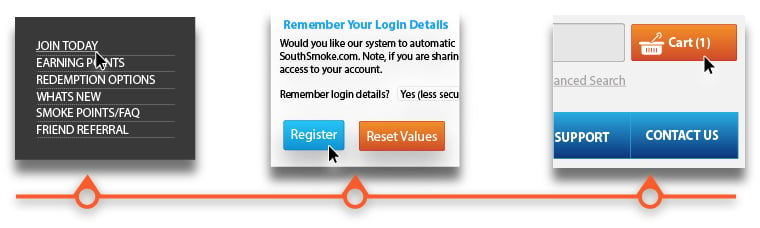
Fill out your information and finalize creating your account.
When you have what you would like in cart, proceed to checkout.
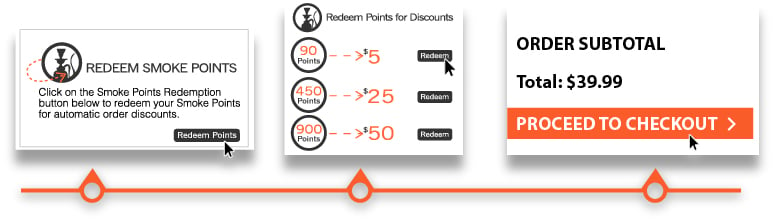
Select the Redeem Smoke Points option to redeem any Smoke Points you have earned.
Select which savings option matches the amount of Smoke Points you have and would like to redeem.
Proceed to Checkout to activate the savings and place your order with SouthSmoke.com.
Hookahs at SouthSmoke.com
SouthSmoke.com is the premier resource for avid Hookah smokers worldwide. Not only does SouthSmoke.com offer the widest selection of Hookah Pipes, Flavored Shisha, and Accessories available, we have consistently exceeded our customers' expectations by providing the Best Selection of Products and Services, Customer Support, and On-Time Delivery commitments available in the industry.
Learn More »


